
Ingestion and retention costs keep climbing
Usage-based pricing can make normal growth, incident spikes, and longer retention expensive to predict.
Centralized log management
Nagios Log Server brings logs from servers, applications, network devices, and cloud resources into one searchable platform—with self-hosted control, configurable retention, and no per-GB software fees.
The pain usually shows up in cost, investigation time, fragmented data, and the difficulty of keeping enough history to answer questions later.
Usage-based pricing can make normal growth, incident spikes, and longer retention expensive to predict.
Servers, applications, network devices, and cloud services produce evidence in different places and formats.
Incidents drag on when teams have to jump between systems instead of searching events in one place.
Security reviews, audits, forensics, and recurring problems often depend on logs that are still searchable weeks or months later.
Keep the data useful
Nagios Log Server centralizes Syslog, Windows Event Logs, flat files, application logs, and other structured or custom formats from on-premises and cloud environments.
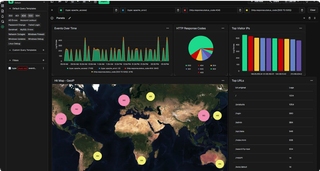
OpenSearch-based indexing, dashboards, filtering, and alerting make the data searchable in near real time, while configurable retention, compression, and archiving let you control how long that history remains available.
Size storage and capacity for your workload—not the software license for every additional gigabyte.
Nagios Log Server software is not licensed by log volume.
Keep the history your policies and investigations require, subject to the storage you provision.
Add clustered instances for capacity, redundancy, and failover.
Plan the deployment
MCS can help estimate log volume, retention needs, storage, query load, and redundancy requirements, then determine whether a stand-alone or clustered Log Server deployment makes sense.
Nagios recommends clustered deployments when redundancy and automatic failover matter, so the architecture should be sized around the operational requirement—not just today’s ingest rate.
Evaluating log management?
Tell us where logs come from today, how much data you generate, how long you need to keep it, and what your team needs to search, alert on, or prove.
Approximate numbers are enough to start; MCS can help work through the sizing.